Free, private dictation · Mac and Windows
sSend it, like, fresh.
Hold fn and talk the way you actually talk: ums, restarts, Indian English, Hinglish. Let go, and Freshflo types what you meant into whatever app you're in.
Also on Windows · early beta · Chrome · Android · previews
- Free and unlimited
- No account
- Works offline
- Gets Hinglish
Works everywhere you type
Speed
Speak 3× faster than you type.
Most people type around 40 words a minute and speak around 150. Freshflo lets you write at the speed you talk, and the words arrive already edited.
Typical adult typing and speaking rates. Your numbers will vary.
How it works
Hold a key. Talk. Let go.
- Speak naturallyHold fn in any app and talk like you would to a person. Your words show up in the pill as you speak.
- Freshflo edits as you speakFillers, false starts and "no wait" corrections are removed. Punctuation, lists and numbers are fixed.
- It lands in any appLet go and the polished text is typed where your cursor is, about a third of a second later.
Try it here
Say something messy. Watch it come out fresh.
Hold the button, or the space bar, and ramble. Or type something rough. This is a quick taste in your browser; the app does far more with AI.
Voice here uses your browser's speech service (Chrome, Edge or Safari). The Freshflo app can transcribe entirely on your Mac.
Made for how you work
Whatever you write, say it instead.
Your style, per app
Sounds like you, in every app.
Formal in Mail, relaxed in Slack, lowercase in Messages. Freshflo matches the tone you set for each app.
hey um so are we still on for lunch tomorrow, I was thinking like one pm, no wait, one thirty
What it fixes
You talk like a person. It writes like an editor.
um so I uh wanted to check in on the deck
I wanted to check in on the deck.
let's meet at 5, no wait, 6 pm
Let's meet at 6 p.m.
send it to devianchu at zerodha
Send it to Divyanshu at Zerodha.
two lakh fifty thousand rupees
₹2,50,000
rahul at the rate gmail dot com
rahul@gmail.com
first my charger second my passport third sunscreen
1. My charger 2. My passport 3. Sunscreen
can you review the PR before lunch
Can you review the PR before lunch?
I I think th- the plan is is ready
I think the plan is ready.
he don't know nothing about it
He doesn't know anything about it.
this build is f***ing broken
This build is broken.
let's grab launch after are meeting
Let's grab lunch after our meeting.
fix the graph q l resolver in next js
Fix the GraphQL resolver in Next.js.
Three keys, three jobs
Dictate. Edit by voice. Ask anything.
Dictate
Hold to talk, release to insert. Tap once for hands-free and tap again to finish. esc cancels.
Edit by voice
Change what you just said without selecting it, or rewrite any selected text.
Ask
Ask a question, or ask about the selected text. Actions on your Mac wait for your OK.
New · Prompt mode
Talk to your AI. It gets a clean prompt.
Ramble the way you'd explain it to a teammate. In Cursor, Claude, ChatGPT and terminals running Claude Code, Freshflo turns it into a clear prompt: the goal first, then every requirement as a bullet.
- Switches on by itself in AI apps, AI chat tabs and AI coding agents. Your other apps keep their style.
- Keeps every requirement, name and number. It never adds its own, and never answers for you.
- Code-aware:
useEffect,localStorageand file names come out spelled right.
“okay so um I want you to build a settings page with dark mode and uh a language picker and also save everything in user defaults but don't change the onboarding screens”
Build a settings page with dark mode and a language picker.
- Save everything in user defaults.
- Don't change the onboarding screens.
Any language in, English out
Speak your language. Send English.
Speak Hindi, Hinglish or any of ten Indian languages and Freshflo writes English, or the other way round. Indian formats are built in.
HindiHinglishBengaliMarathiTamilTeluguGujaratiKannadaMalayalamPunjabiUrdu
- Write in a different language from the one you speak, per app or everywhere.
- ₹ with lakh and crore, and emails said as "at the rate".
- Live words in the pill while you talk, transcribed on your Mac.
kal subah das baje meeting hai, report ready rakhna please
There's a meeting at 10 a.m. tomorrow. Please keep the report ready.
कृपया शुक्रवार तक कॉन्ट्रैक्ट भेज दीजिए
Please send the contract by Friday.
நாளை காலை பத்து மணிக்கு கூட்டம் உள்ளது
There's a meeting tomorrow at 10 a.m.
budget is one point two crore, advance is fifty thousand rupees
Budget is ₹1.2 crore, advance is ₹50,000.
New in 0.11
It formats the way you meant it.
Lists come out as lists, emails as emails, code as code. Plus your meetings, in Claude and Cursor.
“first my charger, second my passport, third sunscreen”
1. My charger 2. My passport 3. Sunscreen
“hi marcus can you send the deck before friday thanks priya”
Hi Marcus, Can you send the deck before Friday? Thanks, Priya
“rename it to camel case fetch user profile in package dot json”
Rename it to fetchUserProfile in package.json.
“he is having fever since two days, me and him will come later”
He has had a fever for two days. He and I will come later.
See every word as you say it, with fillers struck out and what it found: a list, a question, a correction.
Menu → Live Captions
“What did we decide about pricing?”
Pro at $8 a month; Priya updates the page by Friday. [Pricing sync]
Connect in one click. Then ask Claude to “draft a follow-up from my last meeting”.
It reads your Freshflo notes, on your Mac.
Your dictionary, snippets and styles on every Mac through iCloud Drive, or shared with your team through a shared folder.
Free. No account.
Also new: whisper mode for quiet rooms, 100 languages, turn it off in chosen apps, and Your Week, a weekly view of your words and time saved.
Private by design
Your voice stays yours.
Run everything on your Mac with Apple's on-device models, or use the cloud for top accuracy. Every History entry shows which one handled it.
- On-device mode: transcription and cleanup on your Mac, no internet needed.
- No screenshots. Context comes only from the text field you're typing in.
- Password fields are skipped, every time.
- No account. Keys stay in your Keychain; logs record timings, never words.
Can you review the pull request before lunch?
Slack · 10:42On this MacHi Priya, could you send the contract to Divyanshu by Friday?
Mail · 10:15Groq cloudThe invoice is ₹2,50,000, due on the 15th.
Notes · 09:58On this MacShip the onboarding fix today and the pricing page tomorrow.
Linear · 09:31Groq cloudMeeting notes, no bot
Knows who said what, without guessing.
Your mic and the call audio are recorded as two separate tracks, so the transcript is labelled You and Them on any call app, with no bot joining the meeting.
- Zoom, Meet, Teams, Slack huddles and anything else that plays sound.
- Notes you can act on: summary, decisions, and action items with owners and dates.
- Audio is deleted once your notes are written.
Pricing page review · 24 min
Built not to lose your words
Things go wrong. Your words survive.
Freshflo inserts the on-device transcript it was already writing.
The audio is saved to disk, even across a restart. Retry it in one click.
It notices within a second and switches to a microphone that works.
The text stays on your clipboard and you're told.
It transcribes at your pauses, so the end arrives as fast as a short note.
Drop in a WhatsApp voice note or an .m4a and get clean paragraphs.
Native Swift
Forty times smaller.
Most dictation apps ship a whole copy of Chrome to draw a few windows. Freshflo is written in Swift with Apple's own frameworks.
“Typical Electron app” is a popular Electron-based dictation app for Mac (framework plus app archive), measured October 2026. Freshflo figures measured on an Apple Silicon Mac.
| How Freshflo compares | Freshflo | Most dictation apps |
|---|---|---|
| Price and privacy | ||
| Price | Free, unlimited | Word limits, then a monthly subscription |
| Runs fully on your Mac | Yes, on-device Whisper | Usually cloud only |
| Shows where each dictation was processed | Yes | Rarely |
| Use your own model or API key | Yes | Rarely |
| Account needed | No | Usually |
| Dictation | ||
| Fillers, self-corrections, per-app style, dictionary, snippets, about 100 languages | Yes | Often |
| Lists, email formatting and code words from speech | Yes | Sometimes |
| Live captions that show what will be fixed | Yes | Rarely |
| Edit your last dictation by voice without selecting it | Yes, free | Usually paid, needs selected text |
| ₹ with lakh and crore, spoken emails, Indian-English grammar | Yes | Rarely |
| Keeps failed audio for retry, offline fallback | Yes | Rarely |
| Meetings and teams | ||
| Meeting notes with who said what, ask across meetings, notes in Claude and Cursor | Free, no bot | Often paid or limited |
| Shared dictionary and snippets for a team | Free, through a shared folder | Usually a paid team plan |
| Where others can be ahead today | ||
| iPhone and Android apps | Coming soon | Sometimes |
| Team admin, SSO and compliance certifications | Not yet | Enterprise plans |
A general comparison with popular dictation apps for Mac, October 2026. Features vary from app to app.
Pricing
Free during the beta. Everything included.
Free
Everything, unlimited, with no account. Free for the whole beta.
- Every dictation feature: lists, email, code, Prompt mode, live captions
- Meeting notes with who said what, clean transcripts and follow-ups
- Ask your meetings, and use them in Claude and Cursor
- On-device mode, sync, Scratchpad, Your Week
Pro
For people who want the best accuracy with zero setup: a built-in cloud engine, so there's no key to add. The price will be announced before anything is charged.
- No API key needed
- The fastest, most accurate engine
- Priority support
What's free today stays free. Want the fastest engine now? Add a free Groq key in Settings; it takes a minute.
Set up in about a minute
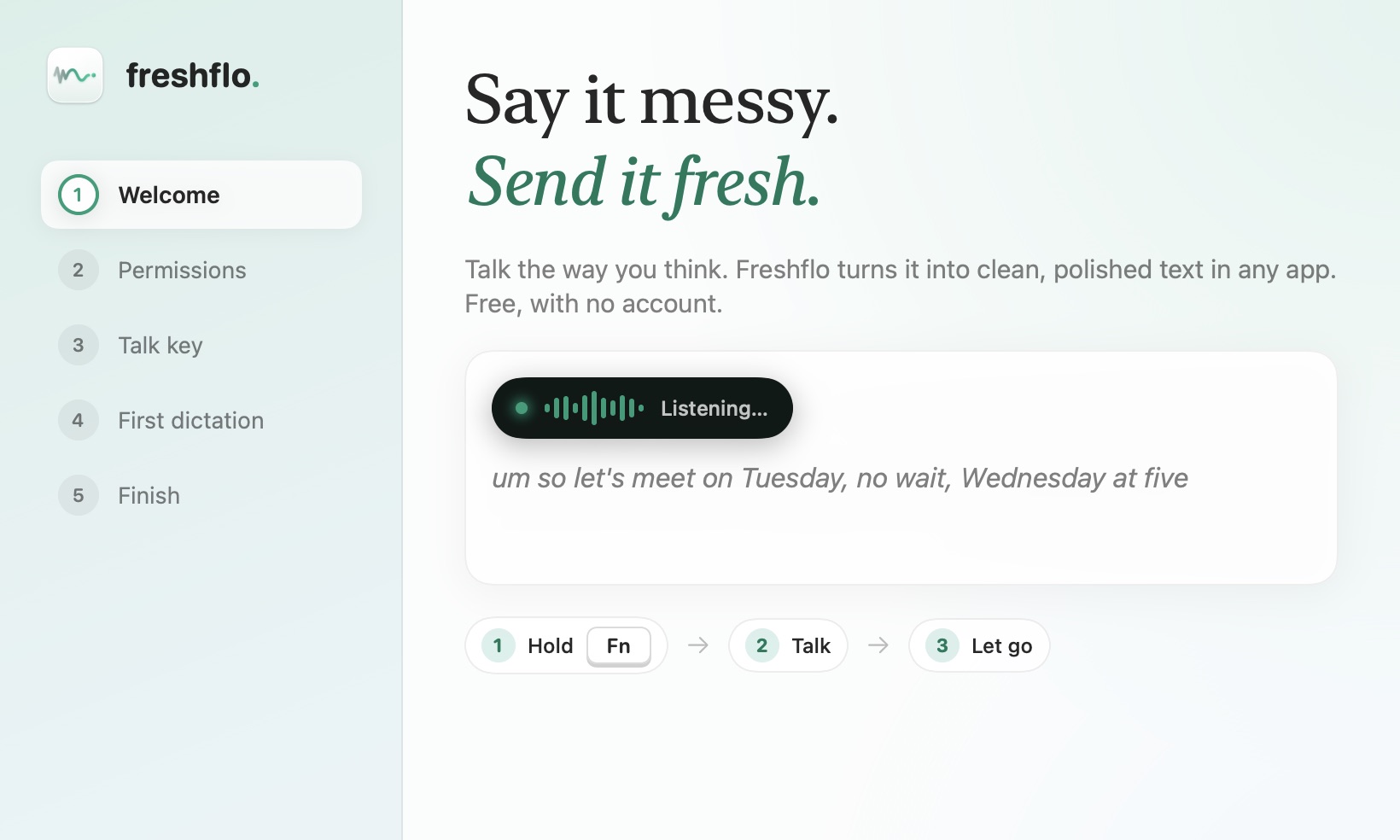
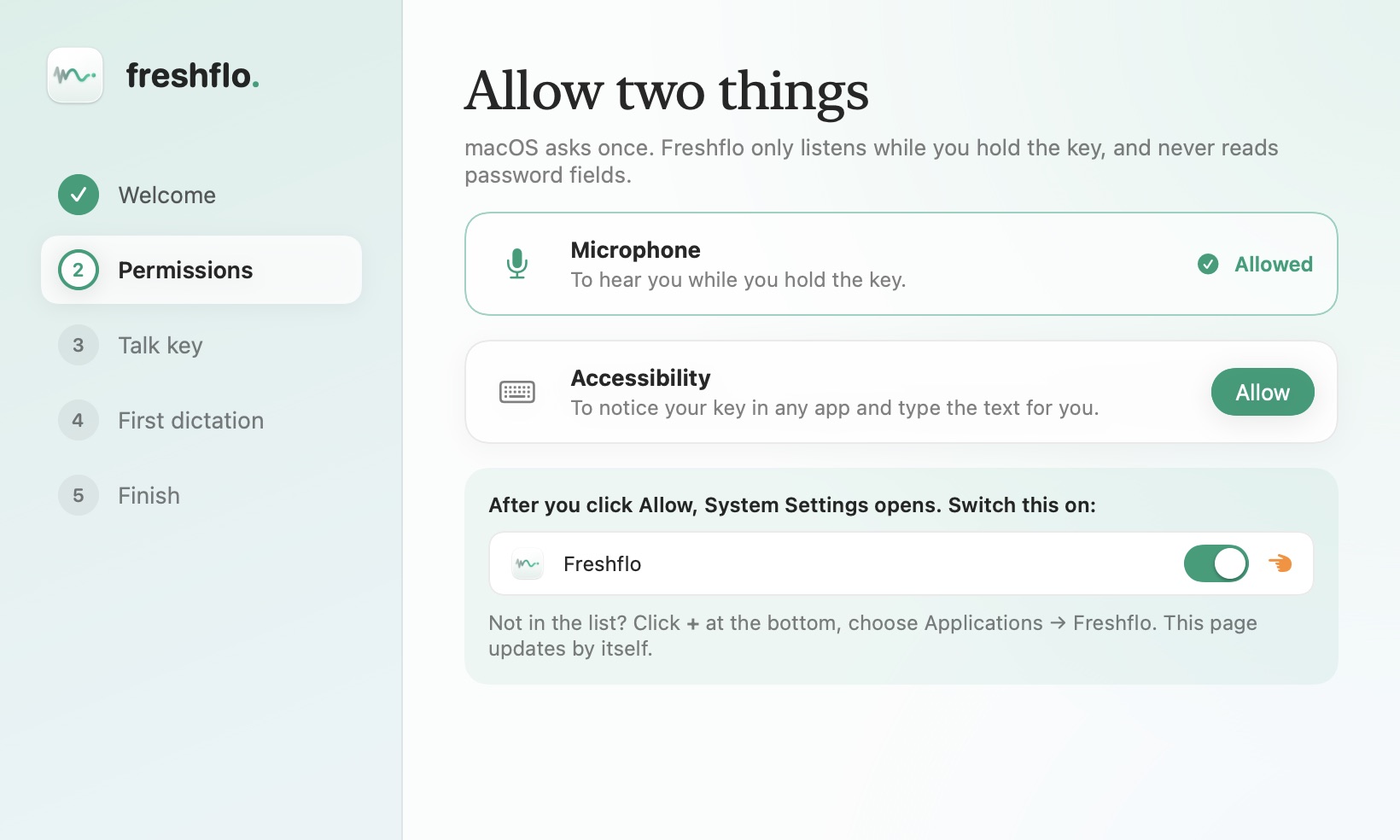
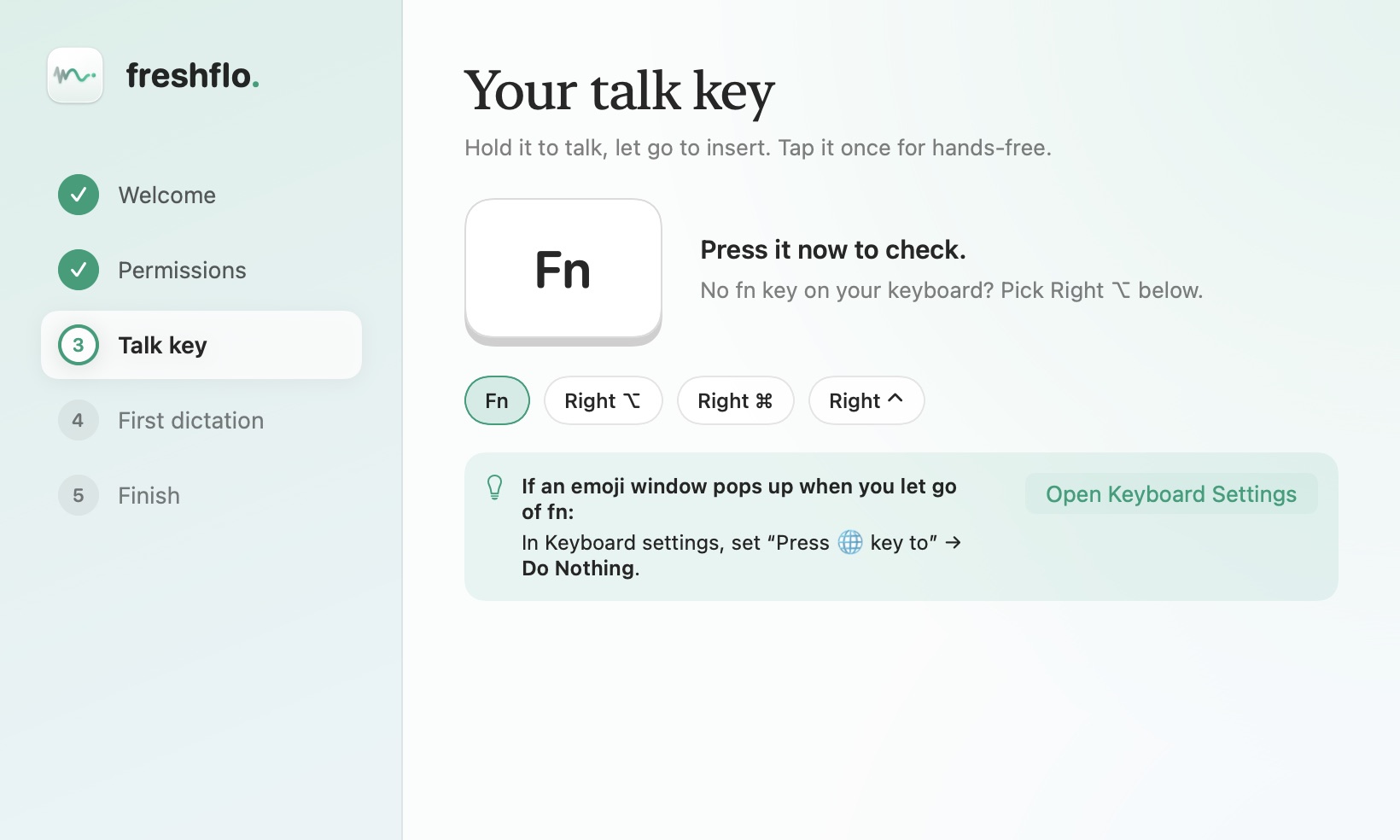
Download. Allow. Talk.
No account and no API key. A short guide walks you through it, and these are the real screens.
Download
Free on your Mac. Ready today.
One small download and a minute of setup, on Mac and now Windows. iPhone and Android are on the way.
Freshflo for Mac
One app for every Mac, Apple Silicon and Intel. Free, unlimited, no account and no API key.
Download Freshflo 0.22.0- Drag it to Applications. Open the download and drag Freshflo onto the Applications folder.
- Open it once. If macOS warns you, click Done, then System Settings → Privacy & Security → Open Anyway. Why?
- Allow two things. Microphone and Accessibility. Setup shows you each switch.
- Hold fn and talk in any app. Updates install themselves from then on.
Freshflo for Windows
The same clean dictation on Windows 10 and 11: fillers gone, grammar fixed, lists and emails laid out. Free, and it works offline: no key, no account.
Download for Windows 0.6.0- Run the installer. No admin rights needed.
- If Windows warns you, click More info → Run anyway. It's a new app that isn't code-signed yet.
- Click Download in Settings to get the offline model (190 MB, once).
- Hold Ctrl + Win and talk in any app. Freshflo lives in the system tray.
Freshflo for Android
A voice keyboard for any app: WhatsApp, Gmail, Instagram. Hold the mic, talk in Hindi, Hinglish or English, let go.
Download APK 0.3.0- Open the download and allow your browser to install apps when Android asks.
- Open Freshflo and follow the three steps: allow the mic, turn on the keyboard, switch to it.
- In any app, hold the mic on the Freshflo keyboard and talk. 🌐 switches back to your usual keyboard.
On iPhone?
Pick what you use and we'll email you once, the day it's ready.
On a Mac and type a lot? Become a beta tester and help shape Freshflo. · We use your email only to tell you when that app is ready. No newsletter, no sharing. Privacy policy
FAQ
Good questions.
Does it work in every app?
Anywhere you can type on your Mac: Slack, Gmail in your browser, Notion, Messages, Cursor, VS Code and the rest. Freshflo checks the text landed. If an app blocks pasting, the text stays on your clipboard.
Why does macOS warn me when I first open it?
Beta builds are signed but not yet notarized by Apple, so macOS asks you to confirm once. Click Done, then System Settings → Privacy & Security → Open Anyway. You only do this the first time; updates install without it.
Which languages does it understand?
About 100 languages. It's tuned for English and Indian languages: Hindi, Hinglish, Bengali, Marathi, Tamil, Telugu, Gujarati, Kannada, Malayalam, Punjabi and Urdu. Pick the language you speak in setup for the best accuracy, and choose a different language to write in if you like.
Does it fix grammar and swear words?
Yes. Freshflo fixes grammar (“he don't know nothing” → “he doesn't know anything”), removes stutters and repeated words, corrects misheard words, and cleans up swear words. In Settings you can choose to keep, mask or clean up swear words, and turn grammar fixing off if you want your exact words.
Is my voice sent to the cloud?
Only if you choose a cloud engine like Groq. The built-in engine uses Apple's speech recognition, on your Mac whenever your Mac supports your language. Every History entry shows whether it stayed on your Mac.
Do I need an API key or an account?
No. Freshflo works the moment you allow the microphone, using Apple's built-in speech engine. If you want the best accuracy for names, accents and Hinglish, setup can add a free Groq key in about a minute. It's optional.
Is there a Windows version? What about iPhone and Android?
Yes: Freshflo for Windows 10 and 11 is in early beta, in the download section above. iPhone and Android are in development; leave your email there and we'll write once, when yours is ready.
Will it work on my Mac?
Yes, on any Mac with macOS 14 Sonoma or later, Apple Silicon or Intel. On macOS 26, cleanup also uses Apple's on-device language model.
Stuck on something else? Help & fixes has step-by-step answers, and a person reads every message.
Your keyboard can take the afternoon off.
Free · macOS 14 or later · Apple Silicon & Intel · No account or API key